



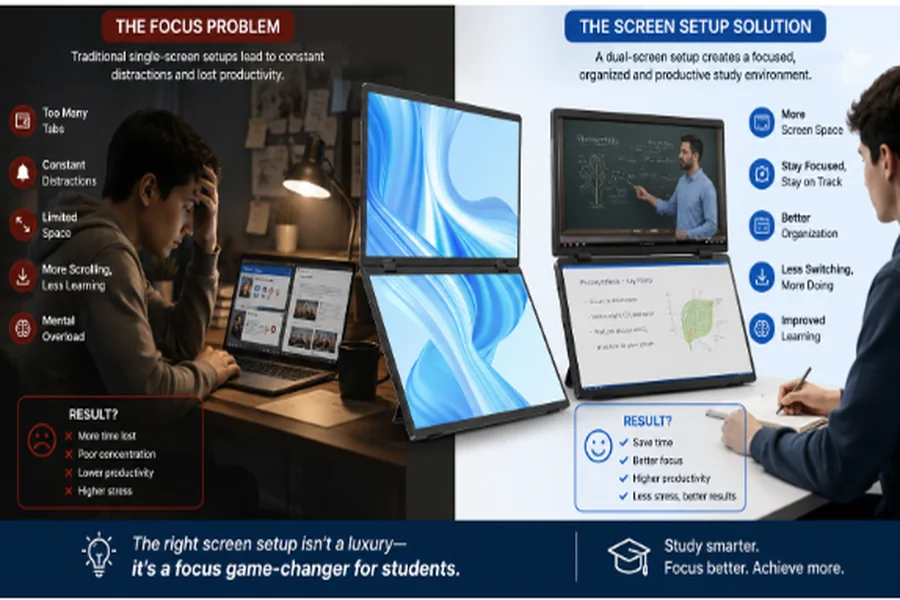
Maintaining focus during study sessions is increasingly difficult. Students have to work with lecture notes, research papers, online classes, word processors, messenger applications, and dozens of open browser tabs. Although motivation and good study habits are essential, the way they set up their physical and digital workspace also impacts how easily they can pay attention.
Screen setup is often an overlooked variable in this equation. A cramped workspace, constant window switching, poor screen visibility, and uncomfortable positioning can create unnecessary friction. An improved display setup may make it easier to organize information, avoid interruptions, and build a more efficient work routine.
Why Can’t Students Focus While Studying?
Difficulty concentrating is rarely caused by just one factor. The usual suspects include digital distractions, multitasking, tiredness, environmental noise, and poorly organized study areas. However, a poor screen setup can also play a role.
1. Constant Digital Interruptions
Messages, alerts, and pop-ups from social media, messenger apps, email, and entertainment services can break concentration. Even a few seconds of distraction may make it harder to focus on a difficult task.
Setting up a dedicated study area and avoiding nonessential notifications can mitigate this problem.
2. Too Much Information on One Screen
Students often need several sources of information available simultaneously. For instance, they may want to watch an online lecture while taking notes, compare research materials while writing an essay, or view a textbook while working on an assignment.
On a small laptop screen, this usually involves repeatedly minimizing, resizing, and switching between windows. This constant task switching can break work flow.
3. Poor Workspace Organization
Cluttered physical desks are distracting, but digital clutter also matters. When files, browser tabs, notes, and communication apps are all crammed together on one display, students may spend more time searching and switching than they do actually studying.
4. Screen Fatigue and Uncomfortable Positioning
Hours of work on a small or poorly positioned screen often encourage students to adopt an uncomfortable posture. Glare, poor visibility, and a bad viewing angle also make extended study sessions less comfortable.
An optimized screen setup cannot eliminate screen fatigue, but it can make the workspace more ergonomic.
How Can Screen Setup Improve Study Efficiency?
A good screen setup gives different study tasks their own visual space. Instead of constantly swapping one window with another, students can keep relevant information visible.
| Study Task | Single-Screen Challenge | Multi-Screen Advantage |
| Online classes | Switching between video and notes | Lecture and notes can stay visible |
| Research | Repeatedly changing browser tabs | Sources and writing can appear side by side |
| Coding | Limited room for code and output | Editor and results can be separated |
| Data analysis | Frequent switching between data and reports | Multiple resources remain accessible |
| Group projects | Video calls cover working documents | Meeting and project files can stay open |
The goal is not simply to add screens. The goal is to use them to create a workspace where each display has a clear purpose.
How a Portable Monitor Can Help Students
A portable monitor can add extra screen space without requiring a permanent desktop setup. This can be valuable for students who study in dorm rooms, libraries, shared apartments, classrooms, or while traveling.
For example, a student can keep a research article on one display and write on another. During an online lecture, the main screen can show the teacher’s presentation while the second screen holds notes or additional materials.
Brands such as UPERFECT have external display options designed for portable and flexible workstations. Subject to device compatibility and personal needs, an additional screen can help turn a laptop-based study setup into a more organized workstation.
Can a Better Screen Setup Reduce Multitasking?
Multitasking can be helpful, but task switching also has its costs. Constantly switching between unrelated apps, documents, and notifications can harm concentration.
Displaying related information side by side can reduce unnecessary task switching. For example, reading a source on one display while taking notes on another is a different activity than repeatedly jumping between a study document and a social media app.
A good setup might look like this:
| Screen | Recommended Use |
| Main laptop display | Primary task: writing, coding, or completing an assignment |
| Second display | Research, lecture video, textbook, references, or notes |
| Phone | Kept away or put in focus mode |
This approach creates a simple visual hierarchy: one screen for active work and one for reference information.
Studying Outdoors and in Bright Environments
Some students like to study near windows, on balconies, in cafés, or in other brightly lit environments. Standard displays can become difficult to read when exposed to strong ambient light and reflections.
A sunlight monitor with the right brightness and an anti-glare screen can help with visibility in brighter environments. Screen brightness is only one part of this. Students should also consider reflections, viewing angles, battery drain, and where the light is coming from.
For outdoor study, finding a shaded place is generally more comfortable than positioning a screen in direct sunlight.
How to Build a More Focused Study Setup
Technology works best when combined with other good study habits. A student can make their workspace more productive by applying a few simple principles:
- Give each screen a purpose. Keep the primary task on one display and supporting materials on the other.
- Turn off unnecessary notifications. Focus or do-not-disturb modes can block interruptions during study sessions.
- Avoid opening unrelated content. Extra screen space should support the task, not create more distractions.
- Position screens comfortably. Keep frequently used displays at a comfortable height and distance.
- Use full-screen or distraction-free modes. Minimize visual clutter when working on demanding tasks.
- Take regular breaks. Screen organization can make work smoother, but students still need breaks during long sessions.
Does Every Student Need a Second Screen?
No. A second display is most helpful for students who regularly work with multiple related applications and information sources.
Students who mainly read, write short documents, or complete simple tasks are often comfortable with a single screen. But students who regularly research, code, attend online classes, edit content, analyze data, or work on complex projects may benefit from additional screen space.
The best setup is the one that reduces friction without adding complexity.
Frequently Asked Questions
Why do students get distracted while studying?
Students may lose focus because of interruptions from notifications, digital distractions, tiredness, environmental noise, lack of clear goals, or switching between multiple tasks and applications.
Will a second monitor increase my study productivity?
A second monitor can increase workflow for work that regularly involves multiple sources and applications. It can also reduce repeated window switching and make related information easier to view simultaneously.
Are portable monitors useful for college students?
Portable monitor can be useful for students who need additional screen space but lack room for a permanent desktop monitor. Its portability also helps with studying in different places.
What do students put on a second screen?
Options include online lectures, research articles, digital textbooks, reference documents, notes, communication tools, or coding output.
Can more screens become a distraction?
Yes. Extra screen space can be distracting if filled with social media, entertainment, or unrelated apps. Productive multi-screen setups require some clear organization.
Final Thoughts
Focus is not just a matter of willpower. Students can also make a difference by organizing their physical and digital environments. A better screen setup can reduce unnecessary window switching, keep related information visible, and create clearer boundaries between primary work and reference materials. Whether that means organizing a single laptop display more effectively or adding a second monitor, the objective is the same: remove unnecessary friction and make focused study easier to maintain.
Students who regularly work across multiple applications can use a thoughtfully designed display setup as a practical part of their more efficient study routine.
